这篇文章将向你展示一个构建基本无监督主题模型的简化示例。我们将使用潜Dirichlet分配(LDA)模型。简而言之,LDA是一个概率模型,其中每个主题被视为单词的混合,而每个文档被视为主题的混合。利用LDA,我们将尝试从语料库中识别潜在主题。

本文假设你能够访问并熟悉Python,包括安装包、定义函数和其他基本任务。如果你是Python新手,那么这是一个很好的开始。
◻️确保安装了numpy、pandaps、nltk、sklearn、matplotlib、seaborn、wordcloud和pyLDAvis;
◻️确保你已从nltk下载了“stopwords”和“wordnet”语料库。
下面的脚本可以帮助你下载这些语料库。
('stopwords')('wordnet')让我们通过导入所需的包来准备环境。我们还将定义一组要忽略的停用词:
数据操纵_colwidth=100可视化(style='whitegrid',context='talk')停用词stop_words=set(ENGLISH_STOP_WORDS).union(('english'))stop_words=stop_(['let','mayn','ought','oughtn','shall'])print(f"Numberofstopwords:{len(stop_words)}")
为了建立直觉,让我们用4个文档创建一个小示例。我们可以看到有两个主题:芒果和棋盘游戏。让我们用LDA来确定主题群:
data=["Weplayedboardgamesyesterday.","Deliciousmango!","Sheplaysboardgameseveryweek.",""]example=({'document':data})example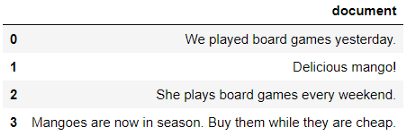
作为第一步,我们将使用词袋方法将文本数据转换为数字数据。进行此转换的最简单方法是使用sklearn中的CountVectorizer():
提取特征/术语名称feature_names=_feature_names()将单词标识成最小长度为3的字母标识tokeniser=RegexpTokenizer(r'[A-Za-z]{3,}')tokens=(document)小写和词根化lemmatiser=WordNetLemmatizer()lemmas=[((),pos=pos_(p[0],'v'))fort,pinpos_tags]转换为文档-术语矩阵vectoriser=CountVectorizer(analyzer=preprocess_text)example_matrix=_transform(example['document'])检查文档-术语矩阵_spmatrix(example_matrix,columns=feature_names)
这看起来更好!如果你对我们刚刚做的预处理的细节不太清楚,这篇文章解释了预处理的基本步骤,并简要解释了词性标记和词义化:。
好的,我们的数据处于模型可理解的状态,所以让我们构建一个简单的模型。
在构建模型时,我们需要为n_components参数定义主题的数量。在这个小例子中,我们知道阅读这四个简短的文档有两个主题。然而,通常你不知道主题的数量,而合适的主题数量则取决于你的判断。
检查主题defdescribe_topics(lda,feature_names,top_n_words=5,show_weight=False):"""打印lda模型中每个主题的前n个单词"""normalised_weights=_/_.sum(axis=1)[:,]fori,weightsinenumerate(normalised_weights):print(f"**********Topic{i+1}**********")ifshow_weight:feature_weights=[*zip((weights,4),feature_names)]feature_(reverse=True)print(feature_weights[:top_n_words],'\n')else:top_words=[feature_names[i]()[:-top_n_words-1:-1]]print(top_words,'\n')describe_topics(lda,feature_names,show_weight=True)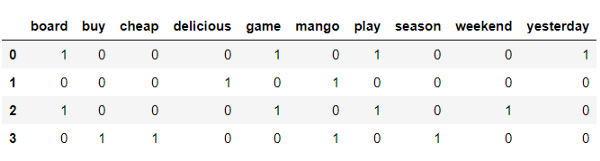
主题1中最重要的单词是“mango”(权重为0.2266),而主题2中最重要的单词是“play”、“game”和“board”(每个单词的权重均为0.1919)。
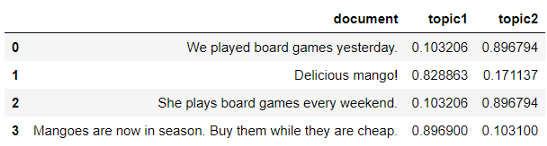
现在让我们将每个主题的概率分配给文档:
example[['topic1','topic2']]=(example_matrix)example

很好,现在我们将通过找到每个记录的概率最高的主题来确定主导主题:
example['top']=[:,1:3].idxmax(axis=1)example['prop']=[:,1:3].max(axis=1)example
我们让主题名称更具描述性:
topic_mapping={'topic1':'mango','topic2':'game'}example['topic']=example['top'].map(topic_mapping)example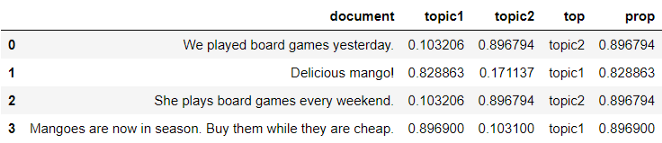
太棒了,现在我们看看它如何为新文档分配主题:
defassign_topic(document):"""使用lda模型预测为文档指定主题。"""tokens=((document))probabilities=(tokens)topic=()topic_name=topic_mapping['topic'+str(topic+1)]returntopic_nameassign_topic("Boardgamesaresofun!")
耶!它正确地预测了主题。热身之后,我们来看一个更现实的例子。
现实的例子在本节中,我们将使用新闻组数据集中的三个主题。这是为了使这篇介绍性文章的内容易于管理,更易于理解。
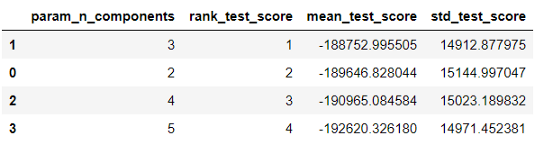
预处理文本vectoriser=CountVectorizer(analyzer=preprocess_text,min_df=5)document_term_matrix=_transform(X_train)检查网格搜索输出results=(lda__results_)\.sort_values("rank_test_score")results[['param_n_components',"rank_test_score",'mean_test_score','std_test_score']]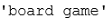
在这种情况下,score表示对数似然值,这个值越高越好。我们发现3个组分的平均测试分数最高。很好,我们知道从新闻组数据中提取了3个主题!我们运行一个包含3个主题的LDA模型,并将其与管道中的预处理步骤放在一起。
如果你不熟悉管道,这篇文章(滚动到1.Pipeline)用一个简单的例子解释了它的作用:。
n_components=3pipe=Pipeline([('vectoriser',CountVectorizer(analyzer=preprocess_text,min_df=5)),('lda',LatentDirichletAllocation(n_components=n_components,learning_method='online',random_state=0))])(X_train)向数据框添加目标标签target_mapping=dict(enumerate(newsgroups['target_names']))df=(df,(newsgroups['target'],name='target'),how='left',left_index=True,right_index=True)df['target']=df['target'].map(target_mapping)#向训练添加目标标签train=(train,df['target'],how='left',left_index=True,right_index=True)train[['document','topic','target']].head()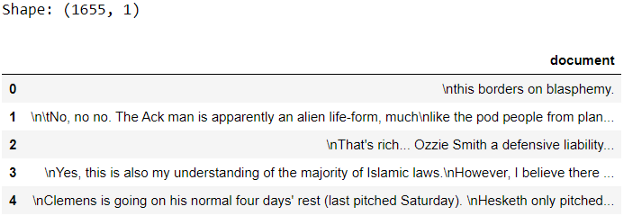
很高兴看到这些主题与这些示例相匹配。你可以进一步扩展检查(例如,查看混淆矩阵)。
让我们仔细看看几个训练示例,看看主题有多准确:
defassign_topic(document):"""使用lda模型预测为文档指定主题"""probabilities=(document)topic=()topic_name=topic_mapping['topic'+str(topic+1)]returntopic_namefori,documentinenumerate(X_(3,random_state=2).values):print(f"**********Testexample{i+1}**********")print(document,'\n')print(f"Assignedtopic:{assign_topic(_1d(document))}",'\n')
到目前为止,这三个例子看起来不错,但是如果你看更多的例子,可能会有一些没有意义的任务。现在让我们为新案例分配主题并检查:
fori,documentinenumerate(X_):print(f"**********Testexample{i+1}**********")print(document,'\n')print(f"Assignedtopic:{assign_topic(_1d(document))}",'\n')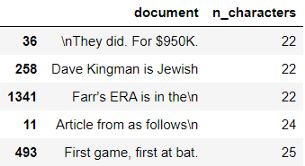
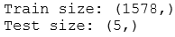
你同意这些任务吗?我们对照一下目标标签:
test=(X_test)test[columns]=(X_test)test['topic']=[:,'topic1':'topic3'].idxmax(axis=1).map(topic_mapping)test=(test,df['target'],how='left',left_index=True,right_index=True)test
瞧,现在你知道如何运行一个基本的无监督主题模型了!
虽然我们在这篇文章中只运行了一次包含3个主题的迭代,但实际上你可能会发现自己使用不同的主题数和其他参数运行多个迭代来找到合适的模型。所以继续尝试吧!⭐️
免责声明:本文章如果文章侵权,请联系我们处理,本站仅提供信息存储空间服务如因作品内容、版权和其他问题请于本站联系